Sharing ATC audio
One pilot shares their ATC app's audio, and Dual Input plays it on everyone else's PC.
Dual Input lets you share your ATC app's audio with your crew. To share yours, open the and turn on Share my ATC.
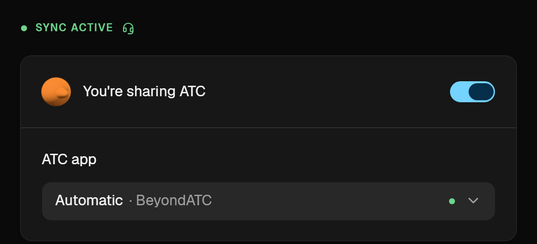
Dual Input finds BeyondATC and SayIntentions by itself. For other ATC apps, pick yours under ATC app, from the list under Playing audio.
How it works
Dual Input records the sound your ATC app plays on the sharing pilot's PC, the way streaming software can capture one app's sound, and plays it on everyone else's PC. It doesn't connect to the ATC app: it only hears what the app plays.
Adjusting volume
Each crew member sets how loud the shared ATC plays for them with Volume on their own .
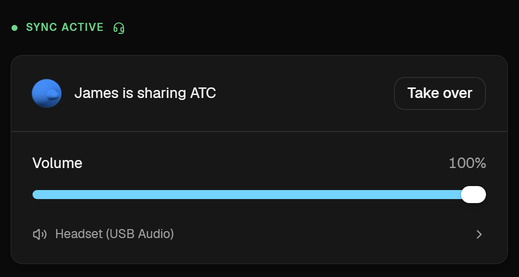
Caution: Avoid turning Dual Input down in the Windows volume mixer, since its other sounds would go down too. If the sharing pilot turns their ATC app down in the Windows volume mixer, Dual Input makes up for it, so the others still hear it at full volume, unless it's turned nearly all the way down.
If the crew hears nothing
If you're sharing:
- If there's no green dot in the ATC app box, Dual Input isn't capturing your app's sound yet: start your ATC app.
- If your app isn't in the list under Playing audio, start it and open the tab again.
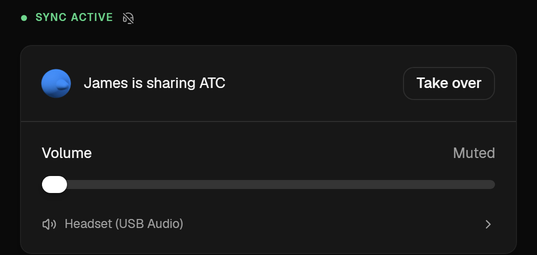
If you're receiving, and the headset in the header is gray and crossed out, your Volume is at 0%:
Known limits
- Dual Input can't share the sim's own ATC, since it plays mixed into the rest of the sim's sound.
- Only the sharing pilot can talk to ATC: the others hear it, but their mic doesn't reach the app.
- Shared ATC reaches the others a fraction of a second after the sharing pilot hears it.