Install Dual Input
Install Dual Input and find it in your sim's EFB.
Before you start, check the requirements.
Download Dual Input
Open Dual Input's latest release on GitHub, and under Assets, select DualInput-win-Setup.exe to download it.
Run the installer
Open DualInput-win-Setup.exe.
Windows might show "Windows protected your PC".
That's because Dual Input isn't signed, so Windows doesn't recognize it.
Select More info, then Run anyway.
Blocked by Smart App Control or your antivirus?
We recommend turning off Smart App Control to use Dual Input.
If your antivirus blocked Dual Input, restore any file it quarantined, and allow Dual Input's folder, %LOCALAPPDATA%\DualInput\.
Add the firewall rule
Once the installer finishes, Dual Input's welcome will open. Its first step offers to add a Windows Firewall rule so your crew members' PCs can connect to yours directly.
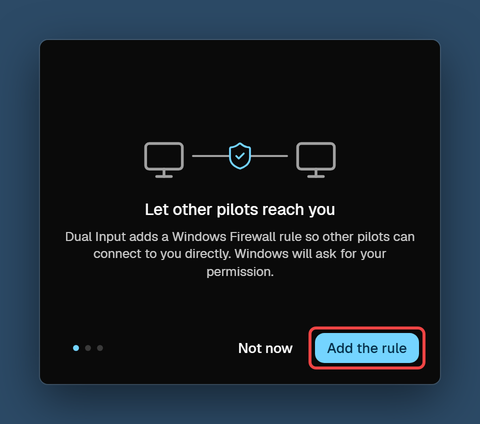
Without the rule you can still fly together, but your connection may run through our , with more delay. Direct vs. Relay explains why.
Find Dual Input in the sim
Dual Input's main app lives in the sim's EFB. Press Tab at the world map or in any flight, and select Dual Input.
If the sim was running while you installed, restart it to see Dual Input.
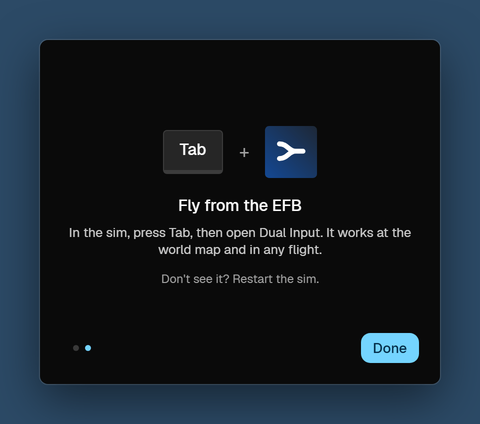
If Dual Input still isn't among the EFB's apps, close the sim, open Dual Input from the Windows Start menu, and start the sim again.