Send a bug report
How to send us what we need to fix a problem.
Each time the starts, usually with the sim, it begins a new run, and keeps the run's log and full recording on your PC.
Sending the log
- In the , select the .
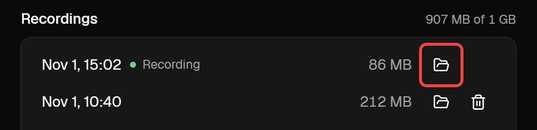
- Under Recordings, find the run where the problem happened: the newest one that started before it.
- Select the folder icon beside that run. File Explorer opens the run's folder on your desktop, behind the sim.
- Send us
log.txtfrom that folder on our Discord, and tell us what went wrong and about when.
If you can't open the EFB app, press Windows+R, paste this, and press Enter:
%APPDATA%\DualInput\recordingsEach folder there is one run, named by when it started in UTC, such as 2026-10-20_14-02-11.
Send the log soon after the flight. Once your runs together pass 1 GB, about 8 to 22 hours of flying, Dual Input deletes the oldest each time it starts. Uninstalling Dual Input deletes every run, so if you're uninstalling because of a problem, send us the log first.
The full recording
We ask for a run's full recording only when its log isn't enough.
The recording is inputs.zst, in the same folder as log.txt.
It holds every action Dual Input took during the run, so we can play the run back on our own PCs.
Privacy
The log and the recording hold what Dual Input did during the run, and may contain paths on your computer, such as an aircraft's location on your disk, and the names of your sound devices. Besides that, they hold nothing personal from your PC. Neither file leaves your PC unless you send it to us.